Written by: Daniel Copping - Lead Integration Developer
If you’ve been following the evolution of Optimizely’s Agentic CMS, you’ll have noticed that headless delivery has become a much bigger part of the platform.
You might have also noticed that headless has become closely associated with SaaS. Optimizely’s SaaS CMS is headless by design, and the assumption tends to be that a modern headless architecture means moving there… but I don’t think that’s the case.
With Optimizely CMS 13, you can do all this in PaaS.
Most of the conversation around Optimizely right now is about AI: the Agent Platform, and the agentic direction of the CMS itself. That’s the layer everyone’s excited about, and rightly so. But agents act on the content and structure underneath them, which makes the architecture beneath all of it worth getting right.
Read on and I’ll explain why headless and SaaS are two separate decisions, what CMS 13 has actually changed, and why PaaS combined with a headless frontend is a sound architecture in its own right.
In short
- Headless delivery and SaaS hosting are two separate decisions in Optimizely CMS 13, not one bundled choice.
- Optimizely CMS 13 supports headless frontends on PaaS. Headless delivery was already possible on CMS 12 PaaS before CMS 13 existed.
- SaaS bundles headless and hosting together, but choosing PaaS does not rule out a headless frontend, and PaaS lets you mix traditional and headless applications side by side.
- CMS 13 adds an Application model for managing multiple frontends, Optimizely Graph as the core content delivery layer, Visual Builder for composing pages, and preview for headless frontends before publishing.
- PaaS gives you a full .NET application you own, which matters when governance, compliance or deep customization requirements exist.
Headless wasn’t new in CMS 13
One thing worth clearing up first is that Optimizely CMS 13 didn’t introduce headless.
CMS 12 could already be used as a headless CMS. You could run Optimizely CMS on PaaS, deliver content through the Content Delivery API or Optimizely Graph, and build your website separately in something like Next.js, React or Vue.
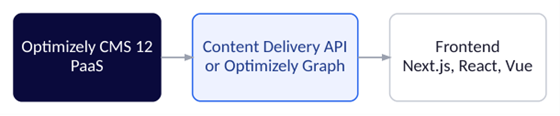
A headless CMS 12 implementation on PaaS
So if you’ve already built a headless CMS 12 implementation on PaaS, CMS 13 isn’t suddenly making something possible that wasn’t possible before.
Applications are now a first-class concept
CMS 13 replaces the old concept of sites with an Application model.
An application represents a website or frontend running against the CMS instance. Importantly, that application can be a traditional server-side-rendered website or a headless frontend that your team builds and hosts separately. If you’re upgrading from CMS 12, your existing SiteDefinition settings are migrated automatically to an in-process application, so your existing site carries on working exactly as it did.
Instead of thinking about the CMS as having one website, you can start thinking about it as having a collection of applications.
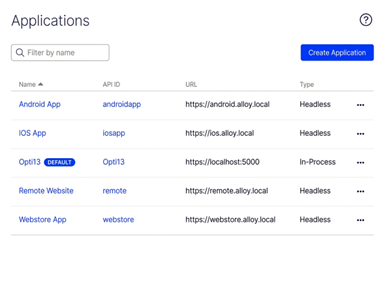
One in-process website and four headless applications, all against the same CMS instance
Each application gets its own start page, hostnames, asset scope and preview behavior. Adding one is a form in the CMS, not a development task.
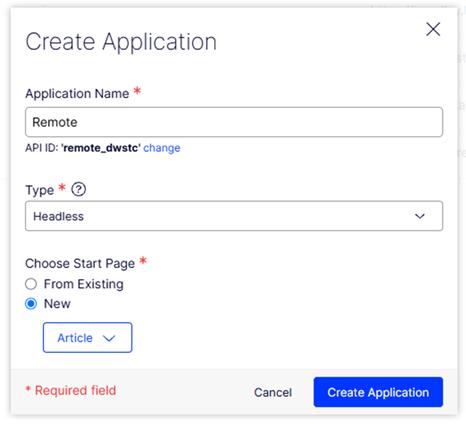
Creating a new application. The Type field is where you choose between a headless frontend and an in-process site
Note, CMS doesn’t impose routing conventions on an application. That matters more than it sounds: a headless frontend controls its own URL patterns, so if you’re migrating from another platform you can preserve the URLs you already have, along with the search rankings attached to them.
One CMS, multiple frontends
Imagine an organization with a main corporate website, a campaign site, a customer portal, a mobile application and a handful of regional websites.
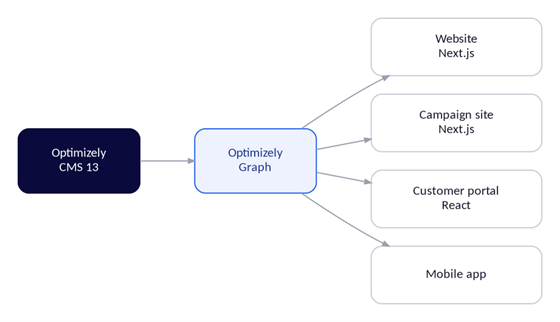
Several independently developed frontends against one CMS instance
These don’t need to be separate CMS installations. They can be separate applications drawing content from the same instance, which means one place to manage content, one set of editorial processes, and one version of the truth about your products, messaging and brand.
Graph is no longer just the API your website calls
Optimizely Graph existed before CMS 13, but its role is significantly more central now.
Graph is used throughout the platform, not only for delivering content to your frontends. It powers content retrieval and search, and underpins features such as Content Manager and DAM integration. In practice it’s mandatory: the CMS will technically run without it, but so much is unavailable that there’s little reason to try. Search & Navigation is no longer supported either.
In CMS 12, you could reasonably think of Graph as the API your headless frontend happened to need. In CMS 13 it’s closer to being the content delivery layer of the CMS. That’s an important distinction. Graph is no longer something you bolt on for the frontend’s benefit; it’s part of how the platform works. It’s also the layer the agentic tooling reads from. As Optimizely leans into AI-driven orchestration, a well-structured, queryable content layer matters well beyond the frontend, because it’s what those agents draw on.
Editors compose experiences, not pages
Visual Builder is the other major part of this story, and it’s the part most likely to matter to the people actually running campaigns.
It allows editors to compose pages from sections, rows, columns and components, rather than filling in a fixed set of fields on a page template. A new landing page doesn’t have to start with a development ticket.
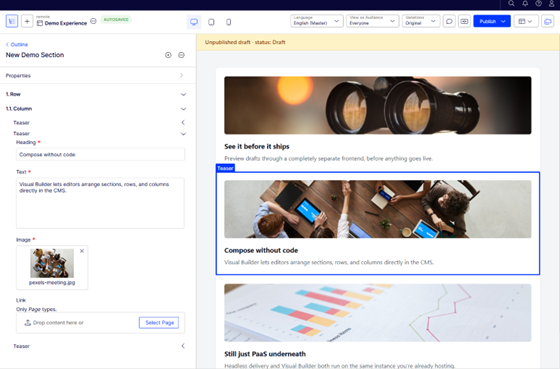
An experience composed from sections, rows and columns on the left, rendered on the right by the separate headless frontend at its preview host — note the unpublished draft status
The important part is that Visual Builder isn’t tied to server-side rendering. The composition is stored as structured content and made available through Graph, so an editor can build an experience and a separately hosted frontend can render it.
Preview before publish
One of the things that becomes apparent when you build headless applications is that publishing content is the easy part. Previewing it is harder. An editor needs to change something and then see what it will actually look like, not in an approximation inside the CMS but in the real frontend.
CMS 13 handles this as part of the Application model. A headless application can be given its own preview address, and when an editor previews a draft, the CMS passes enough information for that frontend to fetch and render exactly the version being looked at, before anything goes live.
That’s a much more complete headless story than simply handing a frontend a content API and leaving it there.
But why not just use SaaS?
If you’re starting a new Optimizely implementation, SaaS can be very attractive. You’re not managing infrastructure, upgrades and hosting in the same way, Optimizely provides a more managed platform, and it’s been built cloud-first and headless-first from the ground up.
But moving to SaaS isn’t a prerequisite for going headless. And for some existing implementations, giving up the flexibility of PaaS is a much bigger decision than it first appears.
It’s worth heading off one related assumption too. Optimizely CMS is now an Agentic CMS, a description that spans both the SaaS and PaaS products. With the Agent Platform front and center it would be easy to read the AI direction as a SaaS story and assume PaaS means sitting it out. It doesn’t. CMS 13 PaaS ships with a range of out-of-the-box agents equivalent to what’s available in SaaS, and both connect to your other Optimizely products through Opti ID.
PaaS runs your code, not just your content
With PaaS, you’re not just configuring a CMS. You start from Optimizely’s packages, build a full .NET application around them, and deploy it into Optimizely’s managed cloud. Optimizely runs the infrastructure; you own what the application does, and it can go well beyond the functions of a CMS. That sounds like a technical detail, but the consequences reach well beyond the development team.
It means integrations aren’t limited to what a frontend can do by calling an API from the browser. Code running inside the application can react to content being published, reshape data on its way in or out, and hold credentials for systems that should never be exposed to the public. That matters more than it sounds, because the complicated requirements are rarely optional. Governance, regulation and established internal processes routinely demand things no product supports out of the box, from approval chains that match a compliance procedure to data handled a particular way for privacy rules. Being able to build that behavior into the application, rather than working around a platform that won’t bend, is easy to undervalue until you need it.
The same extensibility is why there’s such a deep catalogue of community-maintained packages. A lot of what teams assume is simply part of Optimizely (redirect management, SEO and sitemap tooling, security headers, improvements to the editing experience) exists because partners and individual developers built it, open-sourced it and have maintained it for years. Adding one is usually a package install rather than a project, and that ecosystem is part of what you’re buying into.
On top of that, it’s not unusual for a mature implementation to have accumulated a great deal of its own: tailored editing experiences, approval workflows that match how the marketing team actually works, validation that stops content going out wrong. Some of it is small. Other parts become so embedded in how an organization works that editors would struggle without them.
This is where the distinction between headless and SaaS really matters, because you don’t need to give any of it up just because you’ve decided your frontend should be headless.
PaaS + headless is not a compromise
I think this is the part that’s easiest to miss in the CMS 13 story. There’s a tendency to frame the choice as:
PaaS → in-process / traditional web application
SaaS → modern headless architecture
But that’s not really the choice. There are two independent decisions. One is how your content is presented: traditional, headless, or a mix of both. The other is how your CMS is hosted: PaaS or SaaS.
Which gives you PaaS with a traditional site, PaaS with a headless frontend, and SaaS with a headless frontend. On PaaS you can also mix traditional and headless applications within the same architecture, which matters if you’re modernizing gradually rather than all at once. SaaS is headless by design, so it’s the one route where the two decisions come bundled.
It’s worth being clear that on PaaS, “how you host” undersells what you’re actually choosing. A PaaS implementation is a .NET application you own. It can be extended to meet effectively any business requirement, well beyond the functions of a CMS, and it runs on Optimizely’s DXP infrastructure: auto-scaling, CDN, WAF and the rest, managed for you. So the decision isn’t only about where the CMS runs. Going PaaS is also a decision about how much the application can do. That’s the part that tends to get lost when PaaS and SaaS are set side by side as though the only difference is who manages the servers.
Does that mean every Optimizely site should go headless?
No.
There are still plenty of situations where a server-side-rendered site is the right answer, and plenty where SaaS is the right choice. The point is that neither decision forces the other.
If you want a headless frontend, you don’t automatically need SaaS. If you want PaaS, you don’t automatically need a traditional website. And if you’ve already invested heavily in customizing your existing Optimizely implementation, you don’t necessarily need to abandon that investment to adopt a modern architecture.
Summing up
The most interesting thing about CMS 13 isn’t that Optimizely has finally gone headless. It hasn’t — headless was already possible in CMS 12, on PaaS, and plenty of us built it. What’s changed is that the things we used to build ourselves — multiple applications, preview against a separate frontend, Graph as a core delivery layer, visual composition — are now part of the platform.
Headless is an architectural choice. SaaS is an operational choice. SaaS bundles them together, and for plenty of organizations that’s exactly the right answer. What CMS 13 does is make the other combination a serious option: headless delivery, multiple frontends and visual composition, in an application you own and can take as far as you need. And whichever way that decision goes, Optimizely’s AI direction sits on top of it. Agents orchestrating content still need content that’s well modeled, cleanly delivered and properly governed underneath them, and getting that foundation right is what lets everything above it work.
Frequently asked questions
Does going headless with Optimizely require moving to SaaS?
No. Headless delivery and SaaS hosting are separate decisions. Optimizely CMS 13 supports headless frontends on PaaS, and headless delivery was already possible on CMS 12 PaaS before CMS 13 existed.
What does Optimizely CMS 13 actually add if headless already worked in CMS 12?
CMS 13 turns headless from something teams had to build themselves into a supported part of the platform. That includes an Application model for managing multiple frontends, Optimizely Graph as the core content delivery layer, Visual Builder for composing pages without a fixed template, and built-in preview for headless frontends before content is published.
Can one Optimizely CMS instance power multiple frontends?
Yes. Under the Application model, a single CMS instance can serve a traditional website alongside several headless applications, such as a campaign site, customer portal or regional site, all drawing from the same content source.
Does choosing PaaS mean missing out on Optimizely’s AI and agent features?
No. Optimizely CMS 13 PaaS ships with the same out-of-the-box agents available in SaaS, and both connect to other Optimizely products through Opti ID. The Agentic CMS direction applies to both hosting models.
When does PaaS make more sense than SaaS for a headless implementation?
PaaS is worth considering when an implementation has accumulated significant custom logic, integrations or governance requirements, such as approval workflows matched to a compliance procedure or credentials that cannot be exposed to a public frontend. PaaS is a full .NET application you own, so that behavior can be built into the application itself rather than worked around.
Contact
If you’d like to talk more about Optimizely CMS 13 or need help planning your architecture, contact Orchard through hello@orchard.com.au.